
TriNetra · Integrations
One finding, one Jira issue. Every time.
Connect your Jira Cloud account and every finding — from a pentest, a bounty program, or continuous testing — syncs automatically into the ticketing workflow your engineering team already lives in. No duplicate tickets, no manual copy-paste, no finding that quietly never made it into a sprint.
The problem
A finding that lives only inside a security platform is a finding your engineering team has to remember to go check for. In practice, that means someone copies it into Jira by hand, loses the original context, and now there are two records of the same issue that can silently drift out of sync.
How Integrations answers it
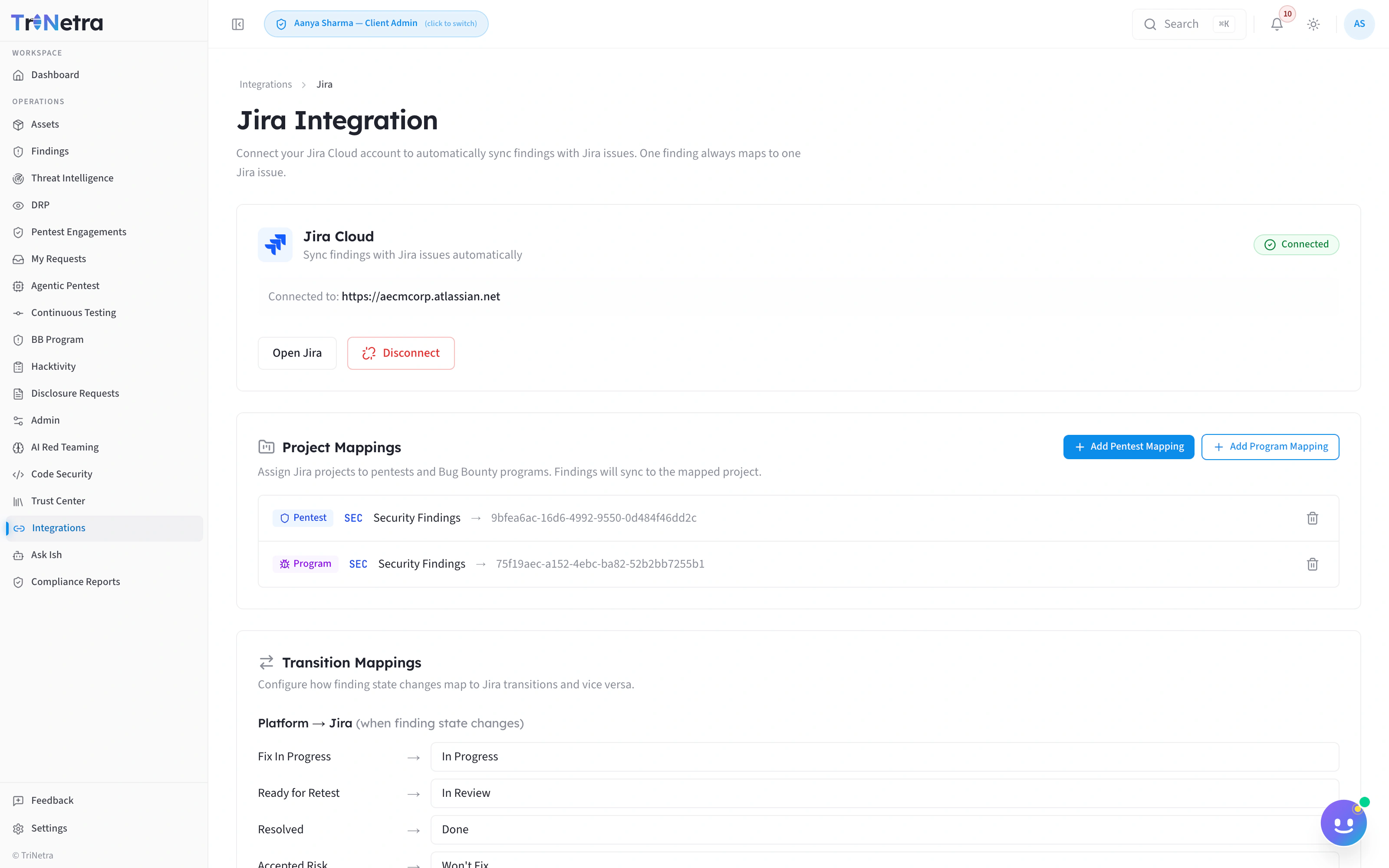
TriNetra's Jira integration is real and live today: connect a Jira Cloud account, map which platform engagement or program routes to which Jira project, and every finding created on that scope creates — and stays synced with — exactly one Jira issue.
“Connect your Jira Cloud account to automatically sync findings with Jira issues. One finding always maps to one Jira issue.”
How it works
Four phases, then it runs itself.
Connect
Authorize your Jira Cloud account (e.g. yourcompany.atlassian.net) from the Integrations panel. Connection state is shown plainly — connected or not, nothing hidden in settings.
Map projects
Set up Project Mappings: bind a specific Pentest engagement or Bug Bounty program to a Jira project ID. Mappings are per-engagement and per-program, and removable at any time.
Map transitions
Configure Transition Mappings — the rules that decide how a state change on the platform drives the matching Jira issue's status forward, so the two systems narrate the same story without a human relaying it.
Sync automatically
From that point on, every finding created in-scope generates its Jira issue automatically, and the one-finding-to-one-issue rule holds for the life of the finding.
What ships in the box
Guarantees, not aspirations.
One finding, one issue — guaranteed.
The platform enforces a strict 1:1 relationship between a finding and its Jira issue, so “which ticket is this actually tracked in” is never a question your team has to ask.
Project Mappings you control.
Route different engagements or programs to different Jira projects — a pentest and a bounty program don't have to land in the same backlog unless you want them to.
Transition Mappings keep status honest.
State changes on the platform (triage, fix-in-progress, retest, resolved) drive the Jira issue forward automatically, instead of relying on someone to update both systems by hand.
Delete a mapping without losing history.
Project Mappings can be removed when an engagement ends, without touching the sync history of issues already created.
On the roadmap
Next on the wire.
Built on the same principle as Jira: full finding context, no duplicate records, status you can trust. Roadmap items are commitments in progress — not shipped features.
Slack
RoadmapReal-time finding and program notifications into a channel.
ServiceNow
RoadmapTicketing sync for organizations standardized on ServiceNow instead of Jira.
GitHub
RoadmapIssue sync for engineering teams tracking security work alongside code.
Available today, alongside Jira: configurable alert rules routing critical and high findings to email and webhooks — a straightforward path into most tools while native integrations ship.
FAQ
Common questions
Does this work with Jira Server or only Jira Cloud?
The live integration is built for Jira Cloud. Jira Server/Data Center is not currently supported.
Can one finding ever create two Jira issues?
No — the mapping is enforced as strictly one-to-one by design, specifically to prevent duplicate tracking.
What happens to existing Jira issues if I remove a Project Mapping?
Removing a mapping stops new findings from syncing to that project; it does not delete or unlink issues already created.
Is Slack or ServiceNow available now?
Not yet — both are roadmap items. Jira Cloud is the only integration live in the product today.
Stop copy-pasting findings into tickets.
Connect Jira Cloud, map your projects and transitions once, and let every finding — pentest, bounty, or continuous testing — land in the right issue automatically.